

MarkLives’ digital agony uncle @DigitalGrandad1 is now taking questions on all issues digital. Tweet them to him or email DigitalGrandad@marklives.com.

Dear Digital Grandad – what the hell is UX all about?
We have appointed an agency to re-build out website and the costs include what the Account Director has line itemed as UX which is quite high. Regardless I haven’t got the foggiest what it is for and what it entails to build a website? Please help Grandad. I am getting all grumpy.
Regards
Mrs Gruppy
Dear Mrs Gruppy
WOW so you are in charge of rebuilding your website which is fantastic news (assuming the old is old) and you haven’t got a glue what UX is all about. Well little Missy here’s my thoughts in less than 140 characters
“Would you build a house without appointing an architect? Well the same goes with building a best in class website”
Well I hope you wouldn’t, otherwise you may end up with a house that looks like this…

A house that has no flow, thought or consideration of what should be where in a logical way based on your needs or lifestyle. Where do you think you are going to mount your mountain bike, park the cars, the kids are going to sleep or where hubby (as Grandpa’s is not sexist) is going to throw away the dirty dishes when you are having a dinner party? Umm sounds like a nightmare to me. You need a plan!
So Little Missy, lets start with the basics and define UX- grandad style and then let me take you through some best-in-class basic steps (and yes you smarty-pants – there are different ways for sure) that are used in building a website with Grandpa’s analogy of building a house fit for queen-bee.
Lets first take a look at the definition of UX by my dear old friend Wikipedia:
In website design, it was important to combine the interests of different stakeholders: marketing, branding, visual design, and usability. Marketing and branding people needed to enter the interactive world where usability was important. Usability people needed to take marketing, branding, and aesthetic needs into account when designing websites. User experience provided a platform to cover the interests of all stakeholders: making web sites easy to use, valuable, and effective for visitors. This is why several early user-experience publications focus on website user experience.[8][9][10][11]
To me a UX specialist or Information Architect (as they are also known as), are like an architect appointed to build your dream house. The maker of a dream house that is suitable to your needs.
So here are my key steps in building a website:
Phase 1 |
ARCHITECT BRIEFING:Meeting your architect to brief him in what you are looking for in your dream house for example:
|
REQUIREMENT CAPTURE:Briefing based on the brands/business needs vs. the needs of the users for example:
Goal
Tasks
|
|
Phase 2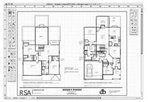 |
ARCHITECT DRAWINGS/IDEASBased on your briefing and vision (like I want to bring the outside inside – now that’s original), the architect will present you with an architects drawing of your dream house… and just maybe individual drawings of key rooms | CONTENT MAPPING & FUNCTIONALDESIGN:Now your UX (yes your very own architect), will present you with a content map (like a schematic of your house / I mean website) and individual wireframes (detailed drawings of key pages based on potentially different personas / user journeys). These are critical to demonstrate the page layout in principle and functionalitiesGoal
Tasks
|
|
Phase 3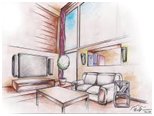 |
INTERIOR DESIGNER:Based on your house design, you need someone to ensure it looks beautiful and showcases your assets and style to its fullest – bling or ding.This could be from fixtures and fittings to look and feel of the softer things like color and decorations. | DESIGN / VISUALIZATIONSThe website with no creative look and feel would be like going to an empty unfurnished house that is unappealing.Goal
Tasks
|
|
Phase 4 |
BUILDING THE HOUSE:Based on your house design, you need someone to ensure it looks beautiful and showcases your assets and style to its fullest – bling or ding.This could be from fixtures and fittings to look and feel of the softer things like color and decorations. | ASSET PREPARATION &RATIONALISATION(in parallel to build):Goal
Tasks
|
|
BUILD:Goal
Tasks
|
|||
Phase 5 |
MOVING INTO YOUR DREAM HOUSE:Now you have built your dream house and ready to move in. You will need to buy or move furniture and test drive your house. But like all new things there may be a few snags… | IMPLEMENTATION AND SUPPORT:Now you have built your website and it it is ready to go live. But it doesn’t end there!Goal
Tasks
|
|
So Missy I hope the above gives you enough information to tell you that you cant build a website without an architect and there is a standard process to building a website like building a house… It starts with a brief and architects drawing and ends with a good builder who can translate the drawings and decorators to make it bling!.
Happy building and moving-in.
– DigitalGrandad is a Marketing Professional with over 140 dog years of practical digital experience working with both global and local brands. From SME’s through to Multinational’s and across industry sectors he has seen and embraced the changes technology has given to us to better our lives. Yes he remembers the old days, but is now a firm traDigitalist born through traditional marketing.
If you have a digital dilemma and are too afraid to ask your boss or your agency, but feel you need to ask for some straight no-nonsense advice, please email me at DigitalGrandad@marklives.com with your question, or better still tweet to @digitalgrandad1. I’ll answer one every week on MarkLives.com.